How do MSPs track vendor contracts and renewals?
For many MSPs, the answer is still a spreadsheet, a shared folder full of PDFs, and calendar reminders that compete with dozens of other alerts.
That approach may work when you have a small number of contracts. As your MSP grows, it becomes much harder to keep track of renewal dates, cancellation windows, pricing changes, owners, and the tools each agreement actually covers.
A reliable MSP vendor contract management process should give you four things:
- One centralized place for every contract
- Clear visibility into renewal dates and cancellation windows
- Automated alerts before important deadlines
- A regular process for reviewing pricing, usage, and value
The goal is simple: know what you are paying for, when you need to make a decision, and whether each vendor is still worth the cost.
Why Does MSP Vendor Contract Management Fail?
The problem usually is not awareness. MSP owners and operators know contracts need to be managed.
The challenge is doing it consistently as the business grows.
An MSP may have contracts for its own RMM, PSA, security tools, backup platform, documentation software, Microsoft 365, communications tools, and other services. Then there are the technologies used across customer environments.
Some contracts bill monthly. Others renew annually or quarterly. Many include auto-renewal terms, pricing increases, or cancellation requirements that require action 30, 60, or even 90 days before the renewal date.
The number of contracts adds up quickly.
A spreadsheet may work at first. Then new customers come onboard, employees change roles, contracts get entered inconsistently, and renewal information becomes outdated.
That is when contract tracking stops being a reliable process and starts becoming a source of risk.
What Should MSPs Track in Every Vendor Contract?
Before choosing a contract management system, define what “tracked” actually means.
At a minimum, every MSP vendor contract should include these five fields.
1. Renewal Date
Track the exact date the agreement renews, not simply the date you originally signed it.
Renewal dates tell you when a new contract term begins, but they are only part of the picture.
2. Cancellation Notice Window
The cancellation notice window may be even more important than the renewal date.
Many vendor agreements require you to provide notice well before renewal if you want to cancel, downgrade, or renegotiate.
For example, if a contract renews on January 1 and requires 90 days’ notice, your real deadline is in early October.
That is when your team needs to make the decision, not January 1.
3. Pricing and Escalation Terms
Record the current price and any language that allows the vendor to increase it.
Look for:
- Annual price increases
- Introductory pricing that expires
- Minimum commitments
- Volume tiers
- Seat requirements
- Overage charges
Understanding these terms makes it easier to compare the contract with actual invoices and budget for future changes.
4. Products, Seats, and Services Included
Document what the agreement actually covers.
That may include:
- Products and services
- Number of licenses or seats
- Usage limits
- Support levels
- Service terms
- Add-ons
- Included features
This gives your team a reference point when usage or billing changes.
5. Contract Owner
Every contract should have one person responsible for it.
That owner receives renewal alerts, reviews the agreement, and makes sure the team reaches a decision before the cancellation window closes.
Assigning clear ownership helps prevent contracts from renewing simply because everyone assumed someone else was handling them.
How Many Vendor Contracts Does an MSP Manage?
There is no single number that applies to every MSP.
The total depends on your size, your customer base, the services you resell, and how much technology you manage on behalf of clients.
Your internal stack alone may include contracts for:
- RMM
- PSA
- Backup
- Cybersecurity
- Documentation
- Microsoft 365
- Communications
- Finance
- Sales and marketing
- Cloud infrastructure
Customer environments add another layer.
Clients may have their own Microsoft 365 licensing, security applications, line-of-business software, cloud services, and other technology agreements. Your MSP may resell some of those products while simply managing or advising on others.
As your customer base grows, vendor contract management quickly becomes difficult to handle through spreadsheets and disconnected reminders.
What Happens When a Vendor Contract Renews Without Review?
Missing a renewal deadline can create more than an administrative headache.
Here are three common outcomes.
You Pay a Price Increase You Did Not Plan For
Some contracts include automatic price increases at renewal.
If no one reviews the agreement before the cancellation or negotiation window closes, your MSP may end up paying a higher rate without having the opportunity to negotiate.
That increase can also affect your margins if customer pricing does not change at the same time.
You Keep Paying for a Tool You Already Replaced
Technology stacks change constantly.
Your team may replace a security tool, communications platform, or other application, but the old vendor contract may continue until someone formally cancels it.
If the cancellation window passes, you can end up paying for overlapping products.
A Vendor Increase Creates an Unexpected Customer Conversation
Vendor pricing changes can affect the services you provide to clients.
When your team catches those changes early, you have time to review the impact, communicate with the customer, and update pricing when needed.
When you discover them after renewal, the conversation becomes much harder.
What Is the Best Way for MSPs to Manage Vendor Contracts?
The most effective contract management processes focus on consistency.
Here are five practices that can help.
Centralize Every Vendor Contract
Keep all vendor contracts in one place.
They should not be spread across email inboxes, employee desktops, shared drives, PSA notes, and folders that only one person understands.
A centralized system gives your team one source of truth for contract information.
Track Cancellation Windows, Not Just Renewal Dates
The renewal date tells you when the contract renews.
The cancellation window tells you when you still have time to do something about it.
Work backward from that date.
For example, if a contract renews on March 15 and requires 60 days’ notice, your team needs to review it in January.
Set alerts around the decision deadline, not just the renewal date.
Review Contracts Regularly
Do not wait for a renewal notice to decide whether a vendor still makes sense.
Review contracts against:
- Current usage
- Current pricing
- Seat counts
- Product overlap
- Business needs
- Available alternatives
Regular reviews can uncover tools that are no longer needed, contracts that should be renegotiated, and costs that no longer match actual usage.
Assign a Contract Owner
Every contract should have a named internal owner.
That person receives the alert, reviews the agreement, and coordinates the renewal decision.
Clear ownership creates accountability and reduces the chance that a contract will renew without review.
Compare Contracts With Actual Spend
Your contract tells you what you agreed to pay.
Your transactions and invoices tell you what you are actually paying.
Comparing the two can help identify:
- Unexpected price increases
- Duplicate charges
- Billing errors
- New fees
- Changes in seat counts
- Charges for tools you thought were canceled
Contract management becomes much more useful when it connects directly to spend visibility.
How BetterTracker Helps MSPs Manage Vendor Contracts
BetterTracker gives MSPs a more organized way to manage vendor contracts, technology spend, and the tools across their business and customer environments.
Centralize Contracts With ContractTracker
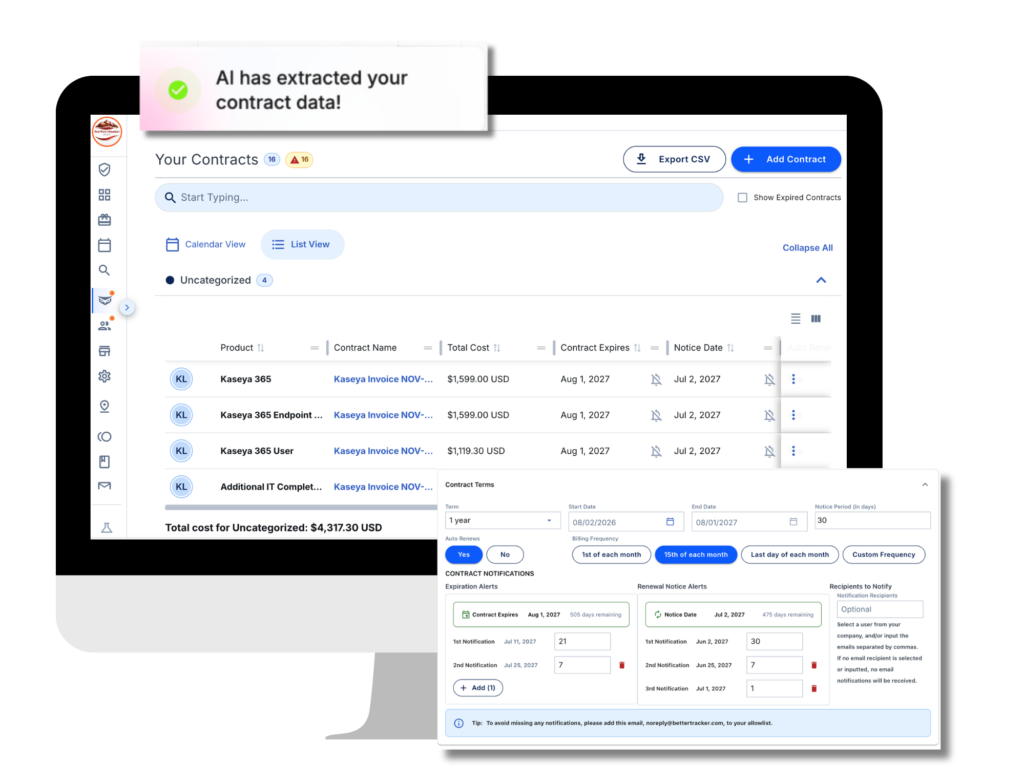
ContractTracker gives you one place to manage vendor agreements and important contract information.
You can track details such as:
- Renewal dates
- Cancellation windows
- Pricing
- Billing schedules
- Next payment dates
- Auto-renewal terms
- Contract owners
Instead of searching through folders and spreadsheets, your team can keep contract details organized in one system.
BetterTracker can also use AI-powered OCR to pull important information from uploaded contracts, helping reduce manual data entry.
Monitor Technology Spend With ExpenseTracker
ExpenseTracker helps you understand what your business is actually spending across vendors and technology.
That gives you another layer of visibility alongside your contracts.
If a vendor charge changes, you can review the transaction against the agreement and determine whether the change is expected.
Understand the Full Technology Stack With NaviStack
Navistack helps you document the vendors, products, and applications across your technology stack.
That visibility matters because contract management starts with a basic question:
What technology are we actually paying for?
When your contracts, spend, and technology stack are easier to see in one place, it becomes much easier to prepare for renewals and identify unnecessary costs.
Vendor Contract Management Should Be a Process, Not a Fire Drill
MSP vendor contract management does not have to mean chasing renewal notices or searching through spreadsheets every time a vendor sends an invoice.
A better process gives you visibility before decisions become urgent.
Centralize your agreements. Track cancellation windows. Assign owners. Set alerts early. Compare contracts with actual spend.
That gives your MSP time to review each vendor relationship, negotiate when necessary, and reduce the risk of paying for technology you no longer need.
BetterTracker helps bring those pieces together so your team can manage contracts, technology spend, and your stack from one place. Book a call with us to learn more.