Microsoft 365 licensing looks simple until you actually try to reconcile it.
How many licenses did you buy? How many are assigned? How many people are actually using them? Are users on the right Microsoft 365 plans? Are former employees or inactive accounts still consuming licenses? And are you paying for third-party applications that duplicate functionality you already own?
For a small business, answering those questions can take more work than expected. For an MSP managing Microsoft 365 across dozens or hundreds of customers, the problem gets significantly more complicated.
Microsoft provides licensing and usage data, but Microsoft 365 license reconciliation isn’t just about counting licenses. The real challenge is connecting licensing, users, activity, applications, contracts, renewals, and spend well enough to understand what the business actually needs.
That is where Microsoft license management starts becoming business optimization.
What Is Microsoft 365 License Reconciliation?
Microsoft 365 license reconciliation is the process of comparing the licenses an organization has purchased with the licenses assigned to users, actual user activity, business requirements, and ongoing costs.
At its most basic, that means answering questions such as:
- How many Microsoft 365 licenses have we purchased?
- How many are currently assigned?
- Which licenses are unassigned?
- Which licensed users are actually active?
- Are disabled or former users still consuming licenses?
- Are some users on more expensive Microsoft 365 plans than they need?
- Are we paying for third-party applications that overlap with Microsoft functionality?
- What licenses or contracts are approaching renewal?
Microsoft’s own reporting separates several pieces of this puzzle. Administrators can view assigned and unassigned licenses under Billing, review licensed users under Active Users, and use usage reports to examine activity across Microsoft 365 services. Microsoft notes that these reports can help identify people who barely use a service and may not need a license.
The data exists.
The harder part is turning all of it into a clear answer to a much more important question:
Are we paying for the Microsoft licenses and technology we actually need?
Why Is Microsoft 365 License Reconciliation So Difficult?
The problem is that there can be several different versions of “license usage.”
A license can be purchased but unassigned.
A license can be assigned to a user who hasn’t been active in months.
An employee can be active but assigned a higher Microsoft 365 SKU than their role requires.
A license may include capabilities the organization is also purchasing from another software vendor.
And an account can look perfectly normal from a licensing perspective while raising questions when you look at actual application activity.
Microsoft itself distinguishes between enabled users and active users in its reporting. Activity is also measured differently depending on the Microsoft product. Exchange activity, for example, is not measured in exactly the same way as Teams or SharePoint activity.
That distinction matters.
Assigned does not necessarily mean needed.
And unassigned does not automatically mean unnecessary, either.
The goal isn’t to indiscriminately remove licenses. It is to identify the accounts, assignments, and costs that deserve a closer look.
What Causes Microsoft 365 License Waste?
License waste usually doesn’t happen because someone deliberately bought something the company didn’t need.
It accumulates.
Employees leave. People change roles. Contractors finish projects. Departments add software without telling IT. Companies upgrade Microsoft plans but don’t revisit the applications those plans may replace. Extra seats remain after a hiring push. Renewals happen before anyone has time to conduct a proper audit.
Over time, relatively small discrepancies can become meaningful recurring expenses.
Some of the most common areas to investigate include:
Inactive users with active licenses
A user may still have a Microsoft 365 license even though they haven’t meaningfully used the associated services for an extended period.
Microsoft provides usage reporting across periods of up to 180 days for many services, which can help administrators identify accounts that warrant investigation.
The important word is investigation. Inactivity doesn’t automatically mean a license should be removed. A leave of absence, seasonal role, service account, or other business requirement may explain it.
But you should know the account exists.
Disabled or departed users still consuming licenses
Offboarding processes are not always perfect.
When an employee leaves, there may be good reasons to preserve their data or account temporarily, but that doesn’t mean every previous license assignment should remain indefinitely.
Microsoft provides administrators with the ability to assign and unassign licenses from individual users or groups.
The bigger challenge for an MSP is finding those exceptions consistently across every environment it manages.
Users on the wrong Microsoft 365 plan
Sometimes the problem isn’t an unused license. It’s an unnecessarily expensive one.
Different employees need different capabilities. A Microsoft 365 plan that makes sense for one department, role, or security requirement may be unnecessary for another.
That makes right-sizing an important part of license reconciliation.
Instead of asking only, “Does this person have a license?”, ask:
“Does this person have the right license for what they actually need?”
Purchased licenses sitting unassigned
Microsoft’s admin center allows organizations to see assigned and unassigned license counts, and administrators can also retrieve available and consumed licensing information programmatically.
Some spare capacity may be intentional.
But if an organization consistently pays for significantly more capacity than it needs, that should be visible before the next purchasing or renewal decision.
Group-based licensing that nobody revisits
Group-based licensing makes Microsoft 365 administration easier, but automation does not eliminate the need for oversight.
Changes in roles, group membership, license dependencies, conflicting service plans, and other assignment issues can create situations administrators need to investigate. Microsoft provides specific reporting for group-based license assignment errors for that reason.
Software that overlaps with Microsoft functionality
This is where traditional Microsoft license reconciliation starts to become much more interesting.
Imagine a customer is paying for a Microsoft plan that includes functionality in a particular area, but employees are also using several third-party products that address similar needs.
Looking only at Microsoft licensing won’t necessarily reveal the whole picture.
You have to look at the broader technology stack.
The Microsoft 365 Questions MSPs Are Asking in 2026
These aren’t theoretical problems.
In current Microsoft and IT communities, administrators are actively discussing how to identify disabled users with licenses, inactive licensed users, over-licensed users, and paid but unassigned licenses. One recent Microsoft 365 community discussion described finding more licensed Microsoft 365 users than actual employees.
As recently as September 2026, administrators were also discussing scripts specifically designed to find licenses assigned to users who haven’t been active for 90 days, including the challenges of reconciling sign-in activity with Microsoft usage reports.
The questions generally come back to the same themes:
How do I find unused Microsoft 365 licenses?
How can I tell whether a Microsoft 365 user is really inactive?
Are disabled accounts still consuming paid licenses?
How do I know whether users are over-licensed?
How do I audit Microsoft 365 licenses across multiple customers?
How often should we review Microsoft 365 licensing?
But there is another question MSPs should be asking:
What else can we learn from the same data?
A Microsoft License Audit Should Look Beyond Microsoft
This is where a traditional license audit often falls short.
Knowing that a customer has 150 Microsoft 365 licenses and 132 assigned users is useful.
Knowing that 17 of those users haven’t been active recently is more useful.
But now add:
- What the customer is actually paying
- Other software employees are using
- Duplicate or overlapping applications
- Contract terms
- Renewal dates
- Upcoming notice deadlines
- Department or application ownership
- Shadow IT
- Security concerns
- Other recurring technology expenses
Now you’re not just doing license reconciliation.
You’re building a picture of the customer’s technology environment.
And that creates a very different conversation.
Why Microsoft License Optimization Matters for MSPs
For MSPs, Microsoft 365 license optimization is about more than cleaning up unused licenses. It gives you another way to demonstrate value with information customers can immediately understand.
A customer may not care how many tickets were closed last quarter. They will care if they are paying for licenses no one uses, carrying software with overlapping functionality, or heading into a renewal without knowing whether they still need everything they are buying.
That gives MSPs an opportunity to bring more useful insights into customer reviews. Instead of simply reporting on what happened, you can show where the environment has changed, where spend may no longer align with usage, what is coming up for renewal, and where there may be opportunities to simplify or reinvest.
It also changes the conversation from “Here’s what we managed for you” to “Here’s what we found, what it means for your business, and what we should look at next.”
That is where license optimization becomes more than an administrative exercise. It connects day-to-day IT management with cost control, technology planning, and better business decisions.
They can also uncover opportunities for additional services when the data identifies genuine technology, security, licensing, or operational gaps.
How BetterTracker Brings Microsoft 365 Licensing Into the Bigger Picture
This is the problem we built BetterTracker to help solve.
365 Scout connects Microsoft 365 data with greater visibility into users, applications, and activity, helping businesses and MSPs identify inactive accounts, potential license waste, and other issues that deserve attention.
For MSPs, that visibility can extend across the customers they manage rather than requiring the same manual investigation to be repeated tenant by tenant.
But Microsoft licensing is only one part of the picture.
BetterTracker brings that intelligence together with information about the rest of the technology environment, including software, contracts, renewals, and expenses.
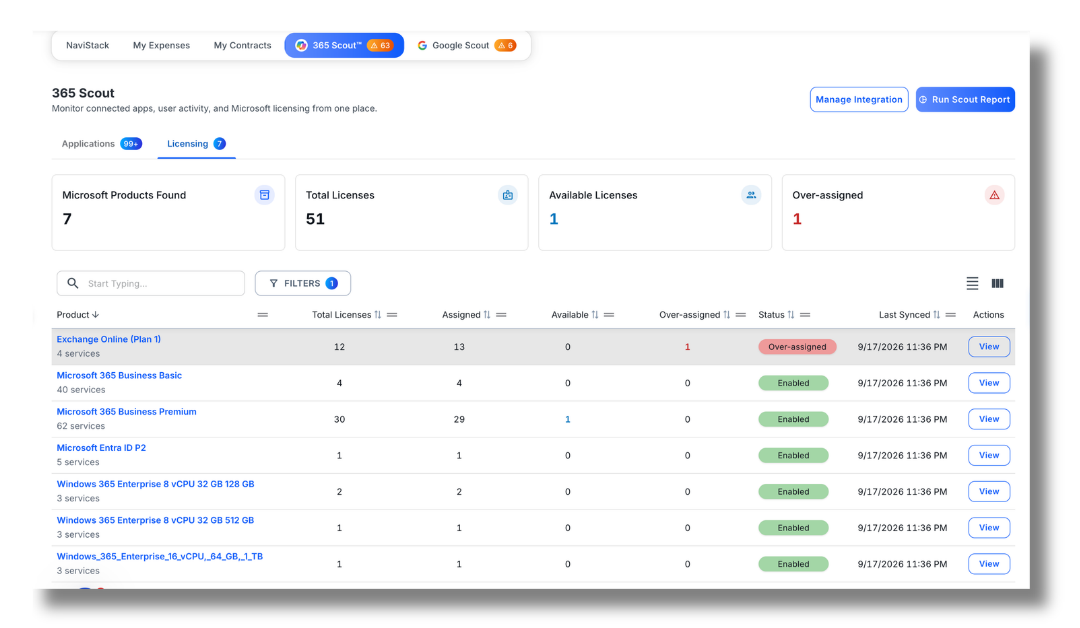
Instead of asking someone to compare Microsoft data against spreadsheets, invoices, contracts, renewal calendars, and separate software inventories, BetterTracker helps create a connected view of the environment.
That makes it easier to investigate questions such as:
- Which users appear inactive but still have Microsoft licenses?
- Where might licenses be reclaimed or right-sized?
- Which Microsoft 365 licenses deserve review?
- What applications are employees actually using?
- Are third-party applications overlapping with other tools in the stack?
- What is the organization paying for those tools?
- Which contracts or renewals are approaching?
- Where are there opportunities to consolidate?
- What should the MSP or internal IT team investigate next?
Microsoft tells you a great deal about Microsoft.
The goal of BetterTracker is to help you understand what the Microsoft data means in the context of the entire technology environment.
From License Reconciliation to Business Intelligence
Consider the difference between these two findings:
“This customer has 12 potentially unused Microsoft 365 licenses.”
And:
“These accounts appear inactive, these licenses deserve review, the customer is also paying for applications with overlapping capabilities, and several related contracts are approaching renewal.”
The first is a licensing observation.
The second gives someone somewhere to start.
That’s an important distinction.
Finding an unused license is valuable. Understanding the economic and operational context around that license can be much more valuable.
Using AI to Make Sense of the Data
As the amount of available data grows, another problem emerges: someone still has to analyze it.
BetterTracker’s AI advisor, Betty, can work across BetterTracker data to help investigate spend, contracts, applications, customers, and optimization opportunities.
That means an MSP can move from asking:
“What licenses does this customer have?”
to questions such as:
“Where should I look for potential waste?”
“What is coming up for renewal?”
“Where are there applications or expenses that deserve investigation?”
“What opportunities should I discuss with this customer?”
AI doesn’t eliminate the need for an MSP’s judgment. It helps reduce the work required to find the signals worth investigating.
That is particularly important when you’re managing multiple customers and the amount of licensing, application, contract, and expense data becomes too large to reconcile manually on a regular basis.
A Better Microsoft 365 License Reconciliation Process
Whether you’re an MSP or managing Microsoft 365 internally, a useful reconciliation process should go beyond counting seats.
Start with six questions:
- What did we buy?
Document Microsoft 365 subscriptions, SKUs, quantities, costs, billing terms, and renewal dates. - What is assigned?
Compare purchased capacity with current license assignments. - What is actually being used?
Review user and application activity rather than treating assignment as proof of usage. - Does each user have the right license?
Look for accounts that may be over-licensed or whose requirements have changed. - What else are we paying for?
Look beyond Microsoft for overlapping, duplicate, inactive, or unapproved applications. - What should we do next?
Turn the findings into specific actions, owners, timelines, and conversations before the relevant renewal or purchasing decision.
That final step is the one that often gets missed.
A good audit shouldn’t just produce data. It should produce decisions.
How Often Should You Reconcile Microsoft 365 Licenses?
There isn’t one review schedule that works for every organization.
A small company with limited employee turnover may need a different cadence than a fast-growing business or an MSP managing many customer tenants.
At minimum, licensing should be reviewed around events that materially change the environment, including:
- Employee onboarding and offboarding
- Role changes
- Large hiring or reduction events
- Microsoft subscription changes
- Contract renewals
- Budget planning
- Mergers and acquisitions
- Changes to the customer’s technology stack
For MSPs, making optimization part of an ongoing customer review process can be more useful than treating it as a once-a-year cleanup exercise.
Frequently Asked Questions About Microsoft 365 License Reconciliation
What is Microsoft 365 license reconciliation?
Microsoft 365 license reconciliation is the process of comparing purchased licenses with assigned licenses, user activity, business requirements, and costs to identify discrepancies and optimization opportunities.
How do I find unused Microsoft 365 licenses?
Microsoft 365 administrators can use the Microsoft 365 admin center to review assigned and unassigned licenses and use Microsoft usage reports to investigate user activity. Microsoft supports reporting periods of 7, 30, 90, and 180 days for many usage reports.
For a broader analysis, businesses and MSPs can also compare Microsoft activity with software usage, contracts, expenses, and renewals.
Can a Microsoft 365 license be assigned but not actively used?
Yes. License assignment and actual usage are different measurements. Microsoft reports both enabled and active users, and its usage reports can help identify users who make little use of a service.
How can MSPs manage Microsoft 365 licenses across multiple customers?
MSPs can manage licensing through Microsoft’s administrative tools, but reviewing multiple environments manually can require significant time and data reconciliation. Tools such as BetterTracker’s 365 Scout are designed to give MSPs visibility into Microsoft 365 activity and potential license waste across customer environments.
What is Microsoft 365 license optimization?
Microsoft 365 license optimization is the ongoing process of aligning licenses with actual business requirements. It can include reclaiming unnecessary licenses, reviewing inactive users, right-sizing license levels, monitoring assignments, and evaluating whether other software costs overlap with capabilities already available to the organization.
What’s the difference between Microsoft license management and SaaS management?
Microsoft license management focuses on Microsoft subscriptions, assignments, entitlements, and usage.
SaaS management looks across the broader software environment, including Microsoft and third-party applications, contracts, expenses, renewals, usage, ownership, and potential overlap.
For many organizations, the biggest optimization opportunities become clearer when those two views are connected.
Stop Treating Microsoft Licensing Like a Spreadsheet Problem
Microsoft 365 license reconciliation isn’t difficult because the basic math is complicated.
It’s difficult because license count, assignment, activity, cost, application usage, contracts, and business need are not the same thing.
The more customers, users, applications, and contracts you’re managing, the harder it becomes to connect those pieces manually.
The goal shouldn’t simply be to find unused Microsoft licenses.
It should be to understand what the organization has, what people actually use, what the business is paying for, where waste or risk may exist, and what deserves attention next.
That is when Microsoft license reconciliation stops being an administrative exercise and starts becoming business intelligence.
Want to see what that looks like across your own Microsoft 365 environment or the customers you manage?
Or book a BetterTracker demo to see how Microsoft 365 data can become part of a broader view of your technology stack, spend, contracts, and opportunities.